Motivation
Picofuse is a software system for hardware-independent development of small event-driven applications. It provides a common interface for hardware peripherals and a build system that abstracts away the details of the underlying hardware. There are a variety of modules which define the abstraction.
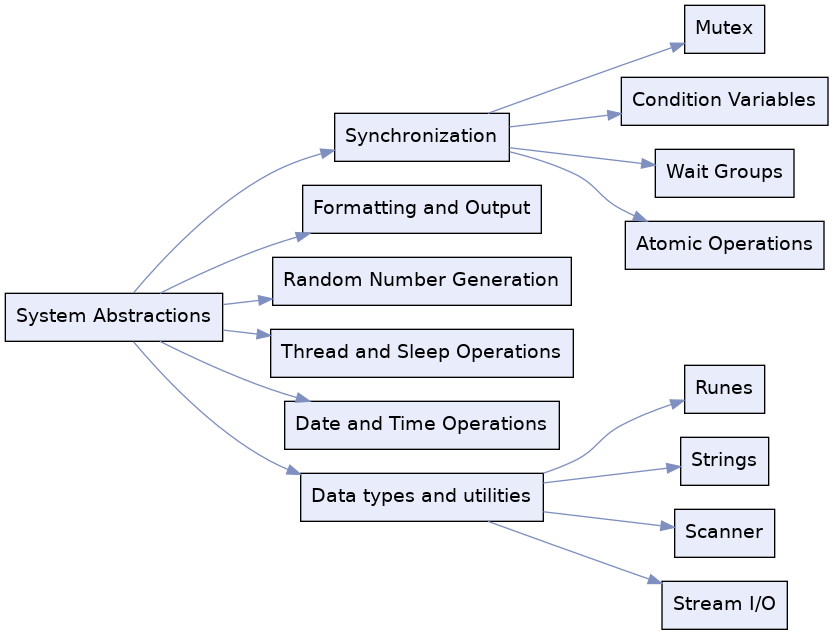
sys: System-level functions.hw: Hardware for peripherals such as GPIO, I2C, SPI, etc.dev: Device implementation for specific components.pix: Graphics library for drawing on displays.fs: Filesystem abstraction for persistent storage.net: Network stack for TCP/IP communication.wav: Audio library for playing and recording sound.hid: Human Interface Device library for handling input events from keyboards, buttons and mice, plus sensor readings.app: Application framework for event-driven programming.
A standalone, per-board "picofuse" installation is built, together with its headers and pkg-config metadata, installed under a plain directory prefix (e.g. /opt/picofuse).
Use
(under development)
- Download the picofuse library, which contains some supported boards, platforms and architectures.
- Use the API documentation for reference, and examine the samples.
You can then build a real .elf for that board using nothing but CMake, pkg-config and the compiler toolchain, via the picofuse_executable() helper installed alongside the prefix (see examples/helloworld):
The following shell commands set up the environment for building the example:
The aim is that prototyping can be performed on a host computer, while deployment to the target hardware (such as Raspberry Pi or Pico) is seamless and requires minimal changes to the code. The executable (or .elf file) will be located in the corresponding build directory, for flashing to the embedded device or executable on the host system.
Development
The following sections assume you are wishing to adapt or otherwise develop the picofuse library.
Requirements
- The
third_party/pico-sdksubmodule (pinned to pico-sdk 2.3.0), which itself pulls in further submodules - tinyusb, btstack, cyw43-driver, lwip, mbedtls.makeinitializes it recursively as part ofconfigure, so there's no need to rungit submodule updatemanually. - An ARM GNU Toolchain (
arm-none-eabi-gccand friends) onPATH. - CMake 3.20+.
- Python 3 (used by pico-sdk's own build for code generation and
picotool).
Pico targets are self-contained, thanks to the Pico SDK. For host builds (Linux, Darwin), the following dependencies enable optional features - required ones are needed for the build to succeed at all, optional ones are only needed to enable the corresponding feature:
| Dependency | macOS (Homebrew) | Debian/Raspberry Pi OS |
|---|---|---|
| OpenSSL (required) | brew install openssl@3 | sudo apt install libssl-dev |
| WPA Supplicant (optional, for WiFi support) | N/A | sudo apt install libwpa-client-dev |
| Mosquitto (optional, for MQTT support) | brew install mosquitto | sudo apt install libmosquitto-dev |
| USB (optional, for USB support) | brew install libusb pkgconf | sudo apt install libusb-1.0-0-dev |
Build & Install
Use make to configure and build:
By default this builds for the host (CMAKE_BUILD_TYPE=Release) into build/. Set PICO_BOARD to cross-compile for a specific board/chip combination, and CMAKE_BUILD_TYPE to change the build type (e.g. Debug):
BUILD_DIR defaults to build - set it to keep per-board build trees separate, as above.
Install with:
This builds and installs into PREFIX (defaults to BUILD_DIR, i.e. build/). Combine with PICO_BOARD and BUILD_DIR/PREFIX to install a per-board prefix, e.g.:
Installing produces, under the chosen prefix:
lib/libpicosdk.a,lib/libpicofuse_sys_pico.ainclude/- every SDK module's headers merged into one consolidated tree, pluspicofuse/andruntime/lib/pkgconfig/picosdk.pc,lib/pkgconfig/picofuse_sys_pico.pc(the latterRequires: picosdk, so pulling it in viapkg-configalso pulls in picosdk's own flags)lib/picosdk/src/- the linker script fragments the.pcfile'sLibspoint at
We'd like to provide pre-compiled per-board libraries (so consumers don't need to build pico-sdk themselves) soon.
Testing
Run the test suite on the host with:
If you are on a Mac and want to run the tests for different operating systems and architectures, you can use the following commands to test on both gcc and clang compilers:
Tests also run when cross-compiling for a Pico board (i.e. with PICO_BOARD set), on real hardware, via a debug probe:
Each test is flashed and run through `testrunner`, which drives a debug probe via OpenOCD and reports pass/fail from the device's own output - see its README for the required OpenOCD build, how to write a test, and testrunner's own flags.
Examples
Example applications are available in the [examples](examples) folder (currently blink and helloworld), showing how to build a real application against an installed prefix.
Documentation
API documentation is generated in Doxygen format:
This requires Docker, and writes the generated documentation into the doc folder.
Licensing
This project is licensed under the [Apache License 2.0](LICENSE). It builds against third-party components with their own licenses (BSD, MIT, Apache-2.0/GPL) - see NOTICE.md for details. Issues and pull requests are welcome.